참고❗❗❗
이 방식은 Stateless하지 않습니다!!!!!!!!!!!!!!!!!!!!!!!
아래 글을 참고해주세요!!!!!!!!!!!!!!!!!!!!!!!!!!!!!!!!!!!!!!!!!!!!!!!!!!!!!!!!!!
2025.03.21 - [Java Study/Frameworks] - Spring Security를 활용한 JWT 인증 | Stateless하게 제대로 적용하기!
Spring Security를 활용한 JWT 인증/인가 | Stateless하게 제대로 적용하기!
2025.02.27 - [Java Study/Frameworks] - Spring Security를 활용한 JWT 인증 적용해보기 🖥️🔑 Spring Security를 활용한 JWT 인증 적용해보기 🖥️🔑필터(JwtFilter)를 직접 등록하고, HttpServletRequest에서 토큰을 추
mannakingdom.tistory.com
필터(JwtFilter)를 직접 등록하고, HttpServletRequest에서 토큰을 추출하는 방식으로 구현되어있던 코드를 Spring Security를 적용하면서 더 안전하고 유지보수가 쉬운 구조로 변경해보았다.
이번 포스팅에서는 두 방식의 차이점과 개선된 부분을 정리해보겠다.
Spring Security 없이 JWT 인증/인가를 구현한 방식:
2025.02.25 - [Java Study/Frameworks] - Spring JWT 인증 과정 뜯어보기 🔑 | Spring Security 없이 구현하는 방법
Spring JWT 인증 과정 뜯어보기 🔑 | Spring Security 없이 구현하는 방법
JWT의 이론에 대해서는 이미 학습을 했고, Spring Boot에서 JWT를 활용하는 방법을 학습하겠다 🤓 [Spring] 인증/인가와 Session 방식과 JWT 방식의 차이인증 / 인가인증 Authentication특정 인증 요
mannakingdom.tistory.com
Spring Security 기반 JWT 인증 구조
1. build.gradle에 Spring Security 추가
implementation 'org.springframework.boot:spring-boot-starter-security'
2. CustomUserDetails 클래스 추가
Spring Security의 UserDetails 인터페이스를 구현하여 사용자 정보를 관리하는 역할.
@Getter
public class CustomUserDetails implements UserDetails {

    private final Long id;
    private final String email;
    private final String password;
    private final UserRole userRole;

    public CustomUserDetails(User user) {
        this.id = user.getId();
        this.email = user.getEmail();
        this.password = user.getPassword();
        this.userRole = user.getUserRole();
    }

    @Override
    public Collection<? extends GrantedAuthority> getAuthorities() {
        return Collections.singleton(new SimpleGrantedAuthority(userRole.name()));
    }

    // 생략
}- 기존 방식: `HttpServletRequest`에서 직접 사용자 정보를 가져옴
- 변경된 방식: `CustomUserDetails`를 통해 일관된 객체로 사용자 정보를 가져옴
3. JwtAuthenticationFilter 적용
JwtAuthenticationFilter 클래스는 OncePerRequestFilter를 상속받아 구현된다.
@Override
protected void doFilterInternal(HttpServletRequest request, HttpServletResponse response, FilterChain filterChain) throws ServletException, IOException {
    String url = request.getRequestURI();

    if (url.startsWith("/auth")) {
        filterChain.doFilter(request, response);
        return;
    }

    String bearerJwt = request.getHeader("Authorization");

    if (bearerJwt == null) {
        // 토큰이 없는 경우 400을 반환합니다.
        response.sendError(HttpServletResponse.SC_BAD_REQUEST, "JWT 토큰이 필요합니다.");
        return;
    }

    String jwt = jwtUtil.substringToken(bearerJwt);

    try {
        // JWT 유효성 검사와 claims 추출
        Claims claims = jwtUtil.extractClaims(jwt);
        if (claims == null) {
            response.sendError(HttpServletResponse.SC_BAD_REQUEST, "잘못된 JWT 토큰입니다.");
            return;
        }

        String email = claims.get("email", String.class);

        UserDetails userDetails = userDetailsService.loadUserByUsername(email);
        UsernamePasswordAuthenticationToken authentication =
                new UsernamePasswordAuthenticationToken(userDetails, null, userDetails.getAuthorities());

        SecurityContextHolder.getContext().setAuthentication(authentication);

    } catch (ExpiredJwtException e) {
        log.error("만료된 JWT 토큰입니다.", e);
        response.sendError(HttpServletResponse.SC_UNAUTHORIZED, "만료된 JWT 토큰입니다.");
        return;
    } catch (JwtException | IllegalArgumentException e) {
        log.error("유효하지 않은 JWT 토큰입니다.", e);
        response.sendError(HttpServletResponse.SC_UNAUTHORIZED, "유효하지 않은 JWT 토큰입니다.");
        return;
    }

    filterChain.doFilter(request, response);
}- 기존 방식
- HttpServletRequest에서 직접 사용자 정보를 추출하는 방식
- 사용 방법: `request.getAttribute("userId")`
- 변경된 방식
- SecurityContext에 인증된 사용자 정보를 저장해서 인증 객체(`UserDetails`)를 활용
- `SecurityContextHolder.getContext().setAuthentication(authentication);`
- 사용 방법: SecurityUtil 클래스 만들어서 활용
4. SecurityUtil 사용
인증된 사용자의 정보를 가져올 때 SecurityContext를 활용하도록 함.
public class SecurityUtil {

    public static CustomUserDetails getAuthenticatedUser() {
        Authentication authentication = SecurityContextHolder.getContext().getAuthentication();

        if (authentication == null || !authentication.isAuthenticated()) {
            throw new AuthenticationCredentialsNotFoundException("사용자 인증 정보가 없습니다.");
        }

        Object principal = authentication.getPrincipal();
        if (!(principal instanceof CustomUserDetails)) {
            throw new AuthenticationCredentialsNotFoundException("잘못된 인증 정보입니다.");
        }

        return (CustomUserDetails) principal;
    }
}- `SecurityContextHolder.getContext().getAuthentication();`로 인증정보를 가져온다.
5. 회원가입 처리에 적용
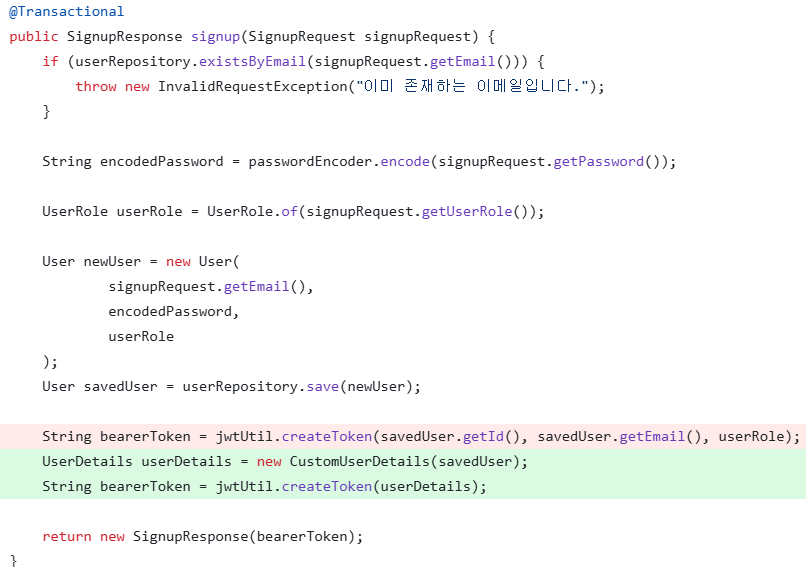
- JwtUtil의 createToken 메서드의 파라미터를 UserDetails 객체로 변경
6. 로그인 처리에 적용
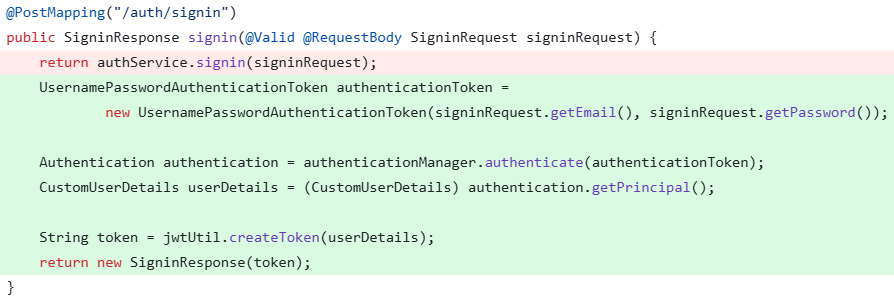
- `authenticationManager.authenticate(authenticationToken);`로 인증 수행
- 인증이 성공하면 반환된 `Authentication` 객체로 토큰 생성
'TIL (Today I Learned)' 카테고리의 다른 글
| 스노우플레이크 방식으로 주문번호 생성하기 (0) | 2025.03.10 |
|---|---|
| SPRING ADVANCED 과제 | ‘내’가 정의한 문제와 해결 과정 기록 📜 (0) | 2025.02.27 |
| Interceptor와 AOP 개념 정리 및 API 로깅 예시 ✍️ (0) | 2025.02.26 |
| Spring JWT 인증 과정 뜯어보기 🔑 | Spring Security 없이 구현하는 방법 (0) | 2025.02.25 |
| git clone 후 build.gradle 빨간 줄❓ 해결 방법‼️ (0) | 2025.02.24 |